
Overview
A fashion bill of materials (BOM) is the itemized, style-level list of every component, quantity, unit of measure, and sourcing reference required to produce a finished garment. Think of it as the production shopping list that connects a designer's intent to a factory floor, a cost sheet, and increasingly, a Digital Product Passport.
Start here: pick one active style and standardize its SKU → component → supplier records as your pilot. Get that one right before scaling the template across the season.
The six fields you need on every BOM line before anything else:
- Component name (e.g., "Shell fabric," "Main zipper")
- Quantity per garment (numeric, not "as needed")
- Unit of measure (meters, pieces, grams)
- Unit cost (in the transaction currency, with the exchange-rate date noted)
- Supplier name and ID (not just a factory nickname)
- Material composition by weight (e.g., 78% cotton, 22% polyester, with tolerance)
If any of those six fields is missing or vague on a line item, that line is not production-ready. Fix it before the BOM leaves your desk.
Key Takeaways
A fashion BOM is both the production shopping list and the foundational evidence record for Digital Product Passports, and it must be governed as a product record, not a working document.
| Point | Details |
|---|---|
| Six mandatory fields | Every BOM line needs component name, quantity, unit, unit cost, supplier identity, and composition by weight before it is production-ready. |
| Single source of truth | PLM governs composition and specs; ERP owns cost actuals and inventory quantities; PIM publishes consumer-facing fields. |
| ESPR adds data depth | EU Regulation 2024/1781 requires component-level composition by weight, supplier identity, country of origin per component, and certificate references for Digital Product Passports. |
| Version control is non-negotiable | Every BOM change after proto sign-off needs a new version number, a change log entry, and co-sign from sourcing and QA. |
| DPP Grid centralizes evidence | DPP Grid imports BOM data, collects supplier documents, and publishes governed product-passport pages, helping brands organize evidence for audits and regulatory readiness. |
Table of Contents
- What is a bill of materials in fashion and how does it fit into the product data flow?
- What exact fields should a garment BOM include?
- What BOM format and storage approach should you use?
- How do you create a BOM from design to production?
- What does a complete BOM look like? Annotated denim jacket example
- How does BOM data translate into cost-of-goods calculations?
- How do you keep BOMs accurate as the season progresses?
- How do you audit a BOM before sign-off?
- Which tools and templates work best for Central-European fashion brands?
- Where should each BOM field live? Field mastership and system ownership
- What do ESPR and Digital Product Passports require Central-European brands to add to BOMs?
- A technical designer's perspective on owning the BOM through the season
- How DPP Grid helps you centralize BOM evidence for regulatory readiness
- Sources
- FAQ
What is a bill of materials in fashion and how does it fit into the product data flow?
The BOM sits at the center of your product data stack, but it is not the same thing as a tech pack. A tech pack is the full design and construction document: measurements, grading, stitch specs, colorways, artwork. The BOM is one structured section inside that tech pack, and it is the section that gets extracted and consumed by every downstream system.
The flow looks like this: tech pack → BOM → PLM/PIM → ERP → production. The tech pack authors the BOM. A PLM (product lifecycle management) system governs it as the single source of truth for composition and specs. A PIM (product information management) system publishes the consumer-facing fields. The ERP consumes quantities and costs for procurement, inventory, and COGS. The factory uses the locked production BOM to cut, sew, and assemble. Each handoff is a potential data-loss point, which is why field mastership matters so much.
Single-level vs. multi-level BOMs
A single-level BOM lists all components one level deep under the finished garment: shell fabric, lining, zipper, button, label, hangtag, polybag. Every component is a direct child of the style. This works well for most SMB brands, fast-sampling workflows, and straightforward cut-and-sew products where no component is itself a sub-assembly.
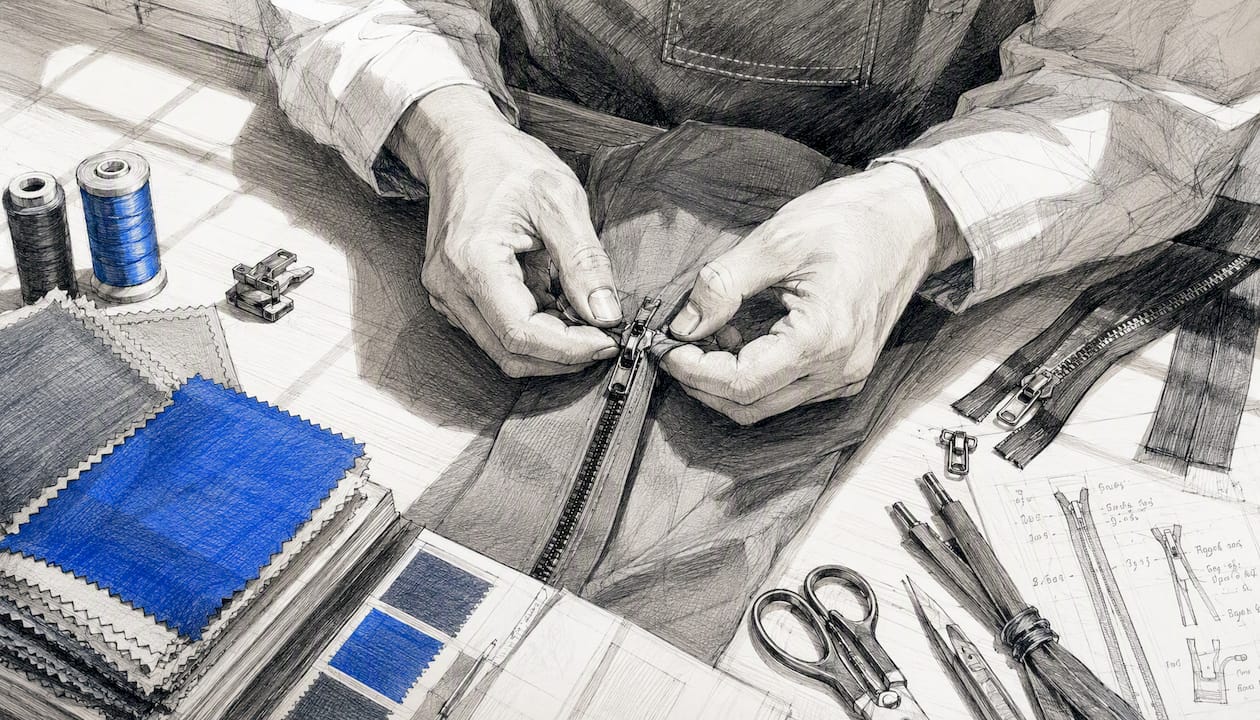
A multi-level BOM adds depth. The zipper assembly, for example, becomes a parent node with its own children: slider, tape, top stop, bottom stop. Multi-level structures are appropriate for complex outerwear with bonded membranes, footwear with multi-component soles, or any product where a sub-assembly is sourced from one vendor and finished by another. They are also necessary when a component's own composition needs to be tracked separately for regulatory evidence.
Most Central-European apparel brands producing mid-complexity garments can start with single-level BOMs and add depth only where a sub-assembly crosses a supplier boundary or carries its own certification requirement.
Who owns what
Responsibility rarely sits in one place. The designer sets the initial component intent. The technical designer (or tech pack owner) drafts and maintains the BOM through sampling. The sourcing team or buyer confirms supplier identity and unit costs. The lab or QA team attaches test reports and certificates. The contract manufacturer records actuals during production. Without clear ownership at each stage, BOMs drift, and drifted BOMs produce costing errors and compliance gaps.
What exact fields should a garment BOM include?
A production-ready BOM groups its fields into logical categories. Here is the full checklist, organized so you can copy it directly into a spreadsheet or tech-pack template.
Component identity
- Component name (standardized, from a controlled vocabulary)
- Component code / SKU (internal reference)
- Color or colorway reference
- Component type (fabric, trim, label, packaging)
Specification
- Material composition by weight (percentage per fiber, with tolerance, e.g., 78% cotton ±3%)
- Weight or count (GSM for fabric, denier for thread, gauge for knit)
- Width (for fabric, in centimeters)
- Finish or treatment (e.g., enzyme wash, PFC-free DWR)
- Construction or weave type
Supplier and sourcing
- Supplier name (legal entity name, not a nickname)
- Supplier ID (your internal code or a GS1 GLN)
- Country of origin for the component (not just the finished garment)
- Lead time (weeks from order to delivery)
- Approved alternatives (secondary supplier code)
Costing and units
- Unit of measure (m, pcs, kg, g, set)
- Quantity per garment (numeric, to two decimal places for fabric)
- Unit cost (in the transaction currency)
- Total cost per garment (unit cost × quantity)
- Currency and exchange-rate date
Production timing
- Order placement date
- Expected delivery date
- Sampling status (proto, SMS, PP, TOP)
Compliance and testing
- Fiber content certification reference (e.g., GOTS, OEKO-TEX Standard 100 certificate number)
- Test report reference (chemical, physical, or performance test)
- Recycled-content claim and supporting evidence reference
- REACH compliance note (for components with restricted substances)
Packaging and labeling
- Care label content (ISO 3758 symbols or text equivalent)
- Country-of-origin label requirement
- Hangtag and barcode specification
Example row (shell fabric, denim jacket): | COO: Czech Republic | Cert: OEKO-TEX 100 #CZ-2024-001
What BOM format and storage approach should you use?
The format question is really a governance question. The file type matters less than where the authoritative record lives.
Excel and CSV
Spreadsheets are fast to set up and universally readable. Every supplier, agent, and factory can open them. The problem is version control: email a BOM spreadsheet to three people and you will have four versions by Friday. For brands with fewer than 50 active styles and a single sourcing contact, a well-structured Excel template with locked column headers and a named-range dropdown for units is a reasonable starting point. Name files with a strict convention: StyleCode_BOM_v01_YYYYMMDD.xlsx and never overwrite a previous version.
PLM-managed BOMs
A PLM system (Centric PLM, Backbone PLM, or similar) treats the BOM as a governed product record with field validation, change history, and role-based access. When a sourcing manager updates a supplier, the system logs who changed what and when. Sampling status flows from proto to production without manual re-entry. For brands managing more than two seasons simultaneously or sourcing from more than a handful of factories, PLM is where the BOM should live. The spreadsheet becomes an export format, not the master.
ERP-mastered item records
In an ERP like NetSuite, the BOM feeds the manufacturing module as a production bill of materials tied to work orders and inventory transactions. NetSuite's BOM functionality links component quantities to purchase orders, tracks actual vs. planned consumption, and rolls up to COGS automatically. This is the right home for cost actuals and inventory quantities, but composition and spec data should still originate in PLM and be pushed to ERP, not authored there.
Recommended column-name conventions: use snake_case or Title Case consistently (fiber_composition_pct, unit_cost_eur, supplier_legal_name). Avoid spaces in column headers if the file will be imported into any system. Use ISO 4217 currency codes in column names (unit_cost_eur, not unit_cost_€) to prevent encoding issues.
Single source of truth: PLM first for composition and specs. PIM for published marketing fields. ERP for cost actuals and inventory quantities. Never let the same field be authored in two systems simultaneously.
How do you create a BOM from design to production?
This is a multi-step process with clear role ownership at each step. Follow it in order and the BOM becomes an auditable record, not a document that gets rebuilt from scratch every season.
-
Design target (Week 1–2). The designer specifies the intended materials, colorways, and trims in the tech pack. The initial BOM is a draft: component names, approximate quantities, and target compositions. No supplier names yet, no costs. Owner: designer.
-
Initial BOM draft in the tech pack (Week 2–3). The technical designer formalizes the BOM inside the tech pack, assigns component codes, sets units of measure, and flags any fields that need supplier confirmation. This is the version sent to the factory for proto sampling. Owner: technical designer.
-
Sampling and supplier confirmation (Week 4–10, depending on product complexity). The sourcing team or buyer sends the draft BOM to approved suppliers and requests fabric swatches, trim samples, and composition certificates. Suppliers return actual compositions, lead times, and unit costs. The technical designer updates the BOM with confirmed values and attaches any certificates received. Owner: sourcing/buyer, with technical designer updating the record. Attach evidence here: OEKO-TEX certificates, GOTS certificates, test reports.
-
Final BOM locked for production (Pre-production sign-off). After the pre-production (PP) sample is approved, the BOM is locked. No changes without a formal change request logged in the PLM or version-controlled spreadsheet. The locked BOM is the document the factory uses to cut fabric and order trims. Owner: technical designer and QA, co-signed by sourcing.
-
Production updates and actuals recording (During and post-production). The contract manufacturer records actual consumption (fabric yield, trim usage) against the planned BOM quantities. Any substitutions made during production must be logged with a reason code and re-approved. Post-production actuals feed back into the ERP for COGS reconciliation. Owner: production/CM, with sourcing and QA reviewing actuals.
Role matrix summary: Designer (step 1) → Technical designer (steps 2, 3, 4) → Sourcing/buyer (step 3) → QA/lab (step 3 evidence) → CM/production (step 5).
Pro Tip: Set a supplier-response deadline of five business days for composition confirmation during sampling. If a supplier cannot confirm fiber content in writing within that window, treat the component as unconfirmed and flag it in the BOM status column. Chasing composition data two weeks before the production order is placed is one of the most common causes of BOM drift.
What does a complete BOM look like? Annotated denim jacket example
The table below shows realistic sample rows for a mid-weight denim jacket. Annotations call out the most common data gaps at each row.
Total material cost per garment: a calculated total material cost per garment
Notice row 2: if the lining fabric changes from virgin polyester to recycled polyester during development, the unit cost shifts and the DPP evidence chain changes entirely. A recycled-content claim requires a supplier declaration and ideally a third-party certificate. That substitution is not just a cost update; it is an evidence update. Log it as a formal BOM revision.
Row 10 illustrates a common gap: "polyester wadding" is a description, not a confirmed composition. Until the supplier provides a written fiber content declaration, that field is incomplete for both production and regulatory purposes.
How does BOM data translate into cost-of-goods calculations?
The BOM is the foundation of your material cost, but material cost is not the same as landed cost. Here is how the math flows.
Step 1: Material cost per garment. Sum all BOM line totals. For the denim jacket above: a calculated total material cost per garment.
Step 2: Add yield loss. Fabric cutting always produces waste. A typical yield-loss factor for woven fabric is a typical yield-loss factor for woven fabric, depending on pattern complexity. For the shell fabric: an accurately measured fabric quantity × an estimated yield loss factor typical in fabric usage = 2.07 m effective consumption. Recalculate: 2.07 m × €4.20 = €8.69 vs. the planned €7.77. That €0.92 difference per garment adds up across a production run.
Step 3: Add direct labor and CMT. Cut, make, and trim (CMT) costs from the factory are not BOM items, but they feed the same cost sheet. Get a confirmed CMT quote before locking the cost sheet.
Step 4: Add hidden costs. These are the lines that kill margin when they are forgotten:
- Freight and logistics: ocean freight per carton, inland transport, last-mile delivery
- Import duties: for Central Europe, EU customs tariff rates apply on the customs value (CIF basis); duty rates for garments vary by HS code and country of origin, so confirm the applicable rate with a customs broker
- QA and testing: lab test fees per style, inspection costs per shipment
- Packaging: polybag, carton, tissue, hangtag (some of these are in the BOM; carton and inner packaging often are not)
- Financing cost: if you pay suppliers before goods arrive, the cost of capital is a real line item
- Currency risk: if your BOM costs are in USD or CNY and your sales are in EUR, note the exchange rate used and the date; currency fluctuations may significantly affect margin
Step 5: Build the landed cost. Material cost + yield loss adjustment + CMT + freight + duties + QA + packaging = total landed cost per garment. This is the number your margin calculation starts from, not the BOM total.
Practical note on currency: always record unit costs in the transaction currency and convert to your reporting currency using a dated exchange rate. Store both values in the BOM. When you reopen a cost sheet six months later, you need to know whether a cost increase was a price change or a currency move.
How do you keep BOMs accurate as the season progresses?
BOMs degrade. A component gets substituted during sampling, a supplier changes, a composition gets "confirmed" verbally but never updated in the file. By the time the production order goes out, the BOM reflects what was planned, not what was agreed. Here is how to prevent that.
Standardization
- Use a controlled vocabulary for component names. "Shell fabric," not "main fabric," "outer fabric," or "body fabric." Pick one term and enforce it across all styles and seasons.
- Mandatory fields: if a field is blank, the BOM line is incomplete. Build this into your template with conditional formatting (Excel) or field validation (PLM).
- Unit-of-measure discipline: fabric in meters, thread in meters, trims in pieces, labels in pieces, weight-based components in grams. Never mix units within a component type.
Version control
- Every BOM change gets a new version number and a change log entry: what changed, who changed it, why, and when.
- The locked production BOM is immutable. If a substitution happens after lock, create a new version and get it co-signed by sourcing and QA before the factory acts on it.
- Naming convention:
StyleCode_BOM_v03_20260215tells you the style, the version, and the date at a glance.
Automation safeguards
- Import validation: if your PLM or ERP accepts BOM imports via CSV, build a validation script that checks for blank mandatory fields, unit-of-measure mismatches, and composition totals that do not sum to 100%.
- Sample reconciliation: after each sampling round, run a comparison between the BOM on file and the supplier's returned data sheet. Flag any discrepancy above 2% in composition or 5% in unit cost for review.
Pro Tip: Build a supplier-submission form (a simple Google Form or a structured email template) that asks suppliers to confirm composition by weight, certificate number, and lead time in a structured format. Unstructured supplier emails are where BOM data goes to die. A form forces the right fields and makes import validation possible.
How do you audit a BOM before sign-off?
Run this checklist before any BOM leaves for production. Each item is a yes/no check.
- Every line has a numeric quantity. No "as required," no blanks, no zeros unless the component is genuinely optional and flagged as such.
- Composition is stated by weight percentage and sums to 100% (or within the stated tolerance).
- Supplier legal name and ID are present on every line, not just "local supplier" or a factory nickname.
- Unit of measure is consistent with the component type (fabric in meters, not "rolls").
- Unit costs are in a named currency with an exchange-rate date.
- All certificates referenced in the BOM are attached or linked in the PLM/document management system.
- The BOM version number and date match the tech pack version they accompany.
- No line has a composition entry that reads "natural fiber," "synthetic," or any other non-specific description. Every fiber must be named.
Red flags that demand immediate review:
- Ambiguous composition entries ("mixed fibers," "as per sample"): these are not compositions. They are placeholders that will fail a retailer audit and cannot feed a Digital Product Passport.
- Missing supplier identity: a component with no named supplier cannot be traced. If a recall or a regulatory query arrives, you need to know who made it.
- Currency mismatches: costs in USD on a BOM where all other costs are in EUR, with no exchange-rate note, will produce a wrong COGS calculation.
- Negative or zero quantities: a sign of a copy-paste error or a deleted component that was not properly removed.
- Absent certificates for recycled-content claims: "30% recycled polyester" with no supporting declaration is an unverifiable claim. Under ESPR and the EU Green Claims Directive, unverifiable claims carry legal risk.
For each red flag, the remediation is the same: go back to the supplier, get the correct data in writing, update the BOM with a new version entry, and attach the evidence before re-submitting for sign-off.
Which tools and templates work best for Central-European fashion brands?
The right tool depends on where you are in your BOM maturity. Most brands move through three stages.
Stage 1: Spreadsheet templates. A well-structured Excel or Google Sheets template with locked headers, dropdown validation for units and component types, and a version-log tab is a legitimate starting point for brands with fewer than 50 active styles. The DPP Grid knowledge center has templates and guides for centralizing product data. The advantage of spreadsheets is speed and zero onboarding cost. The disadvantage is that governance is entirely manual.
Stage 2: Tech-pack tools. Techpacker is a cloud-based tech-pack platform that structures BOM data inside a digital tech pack, making it easier to share with factories and track revisions. For brands that spend significant time on factory communication and sampling management, a dedicated tech-pack tool reduces the email-and-attachment cycle and keeps BOM data attached to the correct style version. Techpacker is accessible to Central-European brands and supports multi-currency cost fields.
Stage 3: PLM and ERP. NetSuite's manufacturing and inventory modules treat the BOM as a governed production record linked to purchase orders, work orders, and COGS. For brands at scale, NetSuite's BOM functionality connects material requirements directly to procurement and inventory planning, eliminating the manual re-entry that causes cost errors. PLM systems like Centric or Backbone add design-phase governance on top of ERP's operational layer.
For Central-European brands preparing for EU regulatory audits, the key selection criterion is not features but data portability: can you export a style-level BOM with composition, supplier identity, and certificate references in a structured format? If the answer is no, the tool will become a bottleneck when a buyer or regulator asks for evidence.
Regulatory traceability workflows, including how web and regulatory data integrate with BOM records, are increasingly part of the compliance picture for brands selling into the EU.
Where should each BOM field live? Field mastership and system ownership
The table below maps the most common BOM fields to their authoritative system. "Authoritative" means the field is authored and governed there; other systems receive it as a read-only value or a synchronized copy.
| BOM Field | Authoritative System | Notes |
|---|---|---|
| Component name and code | PLM | Controlled vocabulary; ERP receives as item master |
| Fiber composition by weight | PLM | Captured at design time; updated at sampling confirmation |
| Supplier legal name and ID | PLM / Sourcing module | Linked to supplier master; ERP receives for PO creation |
| Country of origin (component) | PLM | Required for DPP; must be component-level, not garment-level |
| Unit of measure | PLM | Standardized at item creation; ERP inherits |
| Quantity per garment | PLM / Tech pack | Confirmed at pre-production; ERP uses for MRP |
| Unit cost | ERP / Costing module | Sourcing confirms; ERP owns for COGS and PO pricing |
| Certificate references | PLM / Document management | Attached as evidence; referenced by DPP system |
| Care label content | PLM / PIM | PLM authors; PIM publishes to consumer-facing channels |
| Barcode / GTIN | ERP / PIM | ERP assigns; PIM publishes; DPP system references |
| Recycled-content claim | PLM + Evidence management | Claim in PLM; supporting evidence in document management |
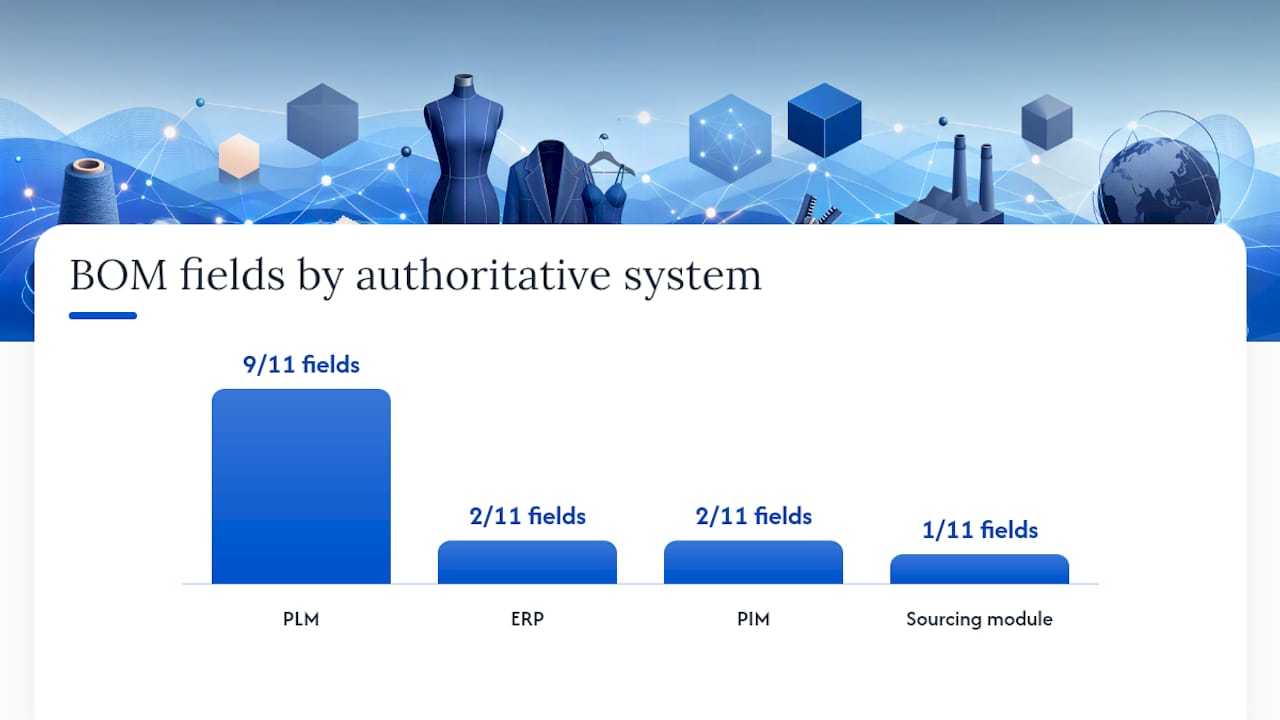
Rules of mastership in practice: composition and specs belong in PLM at design time. If you author them in a spreadsheet and later import to PLM, you have two sources and a reconciliation problem. Cost actuals belong in ERP after the production order closes. Published marketing fields (fiber content for the product page, care instructions for the consumer) belong in PIM, fed from PLM.
Synchronization cadence: push PLM → ERP at pre-production sign-off, when the BOM is locked. Push PLM → PIM at the same time for consumer-facing fields. If a late substitution happens during production, the change must flow through PLM first, then re-push to ERP and PIM. Never update ERP or PIM directly for a composition or spec change; that breaks the evidence chain.
As technical data sheets and single-source PLM discipline show, brands that keep composition and origin in one governed source face fewer audit and retailer integration issues than those managing the same data across multiple files.
What do ESPR and Digital Product Passports require Central-European brands to add to BOMs?
Regulation (EU) 2024/1781 establishes the ecodesign framework for sustainable products and prioritizes textiles, including garments and footwear, in its first working plan. The regulation requires Digital Product Passports for covered product groups, meaning brands selling into the EU market will need to attach structured, machine-readable product data to their garments. For Central-European brands, this is not a distant requirement: retailer requests for DPP-ready data are already appearing in buyer specifications ahead of formal regulatory deadlines.
What this means for your BOM is a significant step up in data granularity. A qualitative BOM ("polyester lining, approx. 0.— m") is not sufficient. DPP records require composition by weight, supplier identity, country of origin per component, certifications, and machine-readable identifiers, all captured at style-level granularity.
Extra fields and evidence your BOM must capture for DPP readiness:
- Component weight as a percentage of total garment weight (not just fabric quantity in meters)
- Supplier legal name and a machine-readable identifier (GS1 GLN or equivalent)
- Country of origin at the component level, not just the finished-garment level
- Certificate number and issuing body for any sustainability or safety claim (GOTS, OEKO-TEX, GRS)
- Test report references (chemical safety, restricted substances)
- Unique product identifier at style level (and eventually at batch or item level for serialized passports)
- Repair and care guidance linked to the style record
- Recycled-content percentage with supporting evidence reference
Regulatory readiness note: Collecting these fields in your BOM is necessary but not sufficient for compliance. Brands that currently receive qualitative BOMs must rebuild data collection from component-specification level upward. A DPP platform can centralize and publish the evidence, but the accuracy and completeness of the underlying BOM data remains the brand's responsibility.
The Digital Product Passport for apparel workflow runs: ingest BOM data → attach evidence documents → review and approve → publish passport with QR code. The BOM is the input; the passport is the output. If the BOM is incomplete, the passport will be incomplete.
An event-based supply chain observability model goes one step further: it preserves material genealogy by logging transformation events (spinning, weaving, dyeing, cutting) and linking certificates and lot IDs to each event. This lets brands compute and prove sustainability claims from upstream evidence rather than relying on self-declaration. For brands making recycled-content or PFC-free claims, this approach is becoming the expected standard in retailer audits.
Fabric composition rules in the EU also require that textile products carry accurate fiber content labeling under EU Textile Regulation 1007/2011, which means the composition data in your BOM must match what appears on the care label and, eventually, the Digital Product Passport.
A technical designer's perspective on owning the BOM through the season
The BOM is not a document you create once and hand off. It is a living record that you are responsible for from the first design sketch to the post-production actuals. Here is how to structure that ownership through the season.
At design capture (Week 1–2): Open the BOM template the moment the style is created in PLM. Enter component names and target compositions from the design brief. Flag every field that needs supplier confirmation with a status code ("TBC"). A BOM with honest gaps is better than one with plausible-sounding placeholders.
At proto sign-off (Week 4–6): Review every TBC field against the proto sample and the supplier's data sheet. Update compositions with confirmed values. Attach any certificates received. If a component changed between the design brief and the proto, log the change with a reason code.
At SMS (salesman's sample) and PP (pre-production) sign-off: Run the audit checklist from the section above. Every mandatory field must be populated. Every certificate referenced must be attached. The BOM version number must match the tech pack version. Do not approve the PP sample if the BOM is incomplete.
During production: Check in with the CM at fabric-cutting start to confirm actual fabric consumption against the planned yield. If the CM reports a substitution (a trim is out of stock, a fabric width changed), treat it as a formal BOM change: new version, new approval, updated evidence.
Post-production actuals (within two weeks of shipment): Record actual consumption quantities in the ERP. Compare actuals to planned quantities.
Calendar checklist for technical designers:
- BOM template opened and component names entered at style creation
- All TBC fields flagged and tracked in PLM task list
- Supplier composition confirmations received and attached before SMS
- Audit checklist passed before PP sign-off
- BOM locked and version-stamped at PP approval
- Production substitutions logged as formal BOM revisions
- Actuals recorded in ERP within two weeks of shipment
- DPP fields (component weight %, COO per component, certificate references) populated before style is published
How DPP Grid helps you centralize BOM evidence for regulatory readiness
Managing BOM evidence across spreadsheets, email threads, and shared drives is where compliance gaps form. DPP Grid gives fashion brands a single place to import product data (from Shopify, CSV, or API), collect supplier information, upload certificates and test reports, and publish permanent product-passport pages with QR codes.

The platform is built for exactly the situation most Central-European brands are in: product data scattered across PLM exports, supplier emails, and lab portals, with a growing list of retailer and regulatory requests for structured evidence. DPP Grid's AI-assisted data extraction helps organize that information, and human review ensures nothing is published without approval. The result is a governed evidence record that sits alongside your BOM, ready for audit, retailer integration, or consumer-facing transparency.
DPP Grid does not replace correct BOM creation. The accuracy of your composition data, supplier identity, and certificate references is still your responsibility. What DPP Grid does is make it significantly easier to centralize that evidence, track what is missing, and publish it in a format that meets Digital Product Passport requirements for fashion.
Start with a a short free trial period on the DPP Grid platform and see how many of your active styles already have the BOM evidence they need, and which ones have gaps worth fixing before the next buyer audit.
Sources
What is a bill of materials in fashion?
A fashion bill of materials (BOM) is the itemized, style-level list of every component, quantity, unit of measure, and sourcing reference required to produce a finished garment, as defined by industry BOM guides. It connects design intent to sourcing, costing, and production, and increasingly serves as the foundational data record for Digital Product Passports.
How do you create a BOM in the garment industry?
Start by entering component names and target compositions in a tech pack at design time, then confirm supplier identity, unit costs, and fiber compositions during sampling, and lock the BOM at pre-production sign-off with all certificates attached. The five-stage workflow covers design target, initial draft, sampling confirmation, production lock, and actuals recording, with the technical designer owning the record throughout.
What extra BOM fields does the EU require for Digital Product Passports?
Regulation (EU) 2024/1781 requires that DPP records include composition by weight per component, supplier identity, country of origin at the component level, certificate references, and machine-readable unique identifiers. Qualitative descriptions like "polyester lining" are not sufficient; every field must be quantified and evidenced.
Why is fabric composition stated by weight percentage?
Weight percentage is the legally required format under EU Textile Regulation 1007/2011 for care labels and product information, and it is the format Digital Product Passports require for machine-readable material disclosure. A composition stated as "mostly cotton" or "cotton blend" cannot be verified, cannot feed a DPP, and will fail a retailer audit.
What is the difference between a single-level and a multi-level BOM in apparel?
A single-level BOM lists all components one level below the finished garment (fabric, zipper, label, polybag), which suits most cut-and-sew products. A multi-level BOM adds sub-assembly depth, for example breaking a zipper assembly into slider, tape, and stops, and is appropriate when a sub-assembly crosses a supplier boundary or carries its own certification requirement.