Overview
Shopify QR codes let you connect physical products, packaging, and marketing materials directly to your online store with a single scan. Shopify's built-in Shopcodes app generates QR codes that link to product pages or checkout, and third-party apps extend that with dynamic codes, analytics, and compliance-ready formats. Here is what you can do with them:
- Link to a product page so shoppers get full details, reviews, and images on mobile
- Link directly to checkout with a product already in the cart, optionally with a discount code applied
- Drive offline traffic online via packaging, retail displays, receipts, and print ads
- Track scan performance through Shopify analytics or third-party app dashboards
- Meet EU compliance requirements using GS1 Digital Link QR codes for Digital Product Passports
The distinction between a basic marketing QR code and a compliance-ready one matters more than most merchants realize, especially if you sell into Central Europe. Both start the same way. Where they end up is very different.
How to generate QR codes for your Shopify store
Shopify gives you two paths: the native Shopcodes app and third-party QR generators. Both work, but they serve different needs.

Using Shopify Shopcodes
Shopcodes is Shopify's own QR code app, free to install from the Shopify App Store. Here is the step-by-step process:
- Install Shopcodes from the Shopify App Store and open it from your admin.
- Click "Create Shopcode" and give the code a title you will recognize later.
- Choose a scan destination: either "Link to a product page" or "Link to checkout page with product in the cart."
- Select the product and variant you want the code to apply to.
- Add a discount code (optional) if you want to reward customers who scan.
- Toggle "Include help text" if you want a brief instruction printed above the code.
- Click Save, then Download. Shopify gives you a PNG for digital use and an SVG for print.
You can create a Shopcode directly from a product's detail page in your admin, which saves time when you are working through a catalog. Existing codes can be edited, deleted, or re-downloaded from the Shopcodes app at any time.
Using third-party QR code generators
For merchants who need dynamic codes, bulk creation, or more design control, third-party QR generators integrate with Shopify through the App Store or via URL. Dynamic codes let you change the destination URL after the code is already printed, which is useful for seasonal campaigns or evolving product pages.
When evaluating a third-party tool, check whether it supports GS1 Digital Link format, offers scan analytics, and allows you to export SVG files for print. Some platforms also offer white-label options and custom domain redirects, which keep the scan experience on-brand.
Pro Tip: Always choose dynamic QR codes over static ones for any code that will be printed on packaging or physical materials. Dynamic QR codes let you update the linked destination without reprinting, which protects your investment and keeps product information current.
Best practices for implementing QR codes in ecommerce
Getting a QR code onto packaging is the easy part. Getting it scanned reliably is where most merchants leave performance on the table.
Design for scan reliability
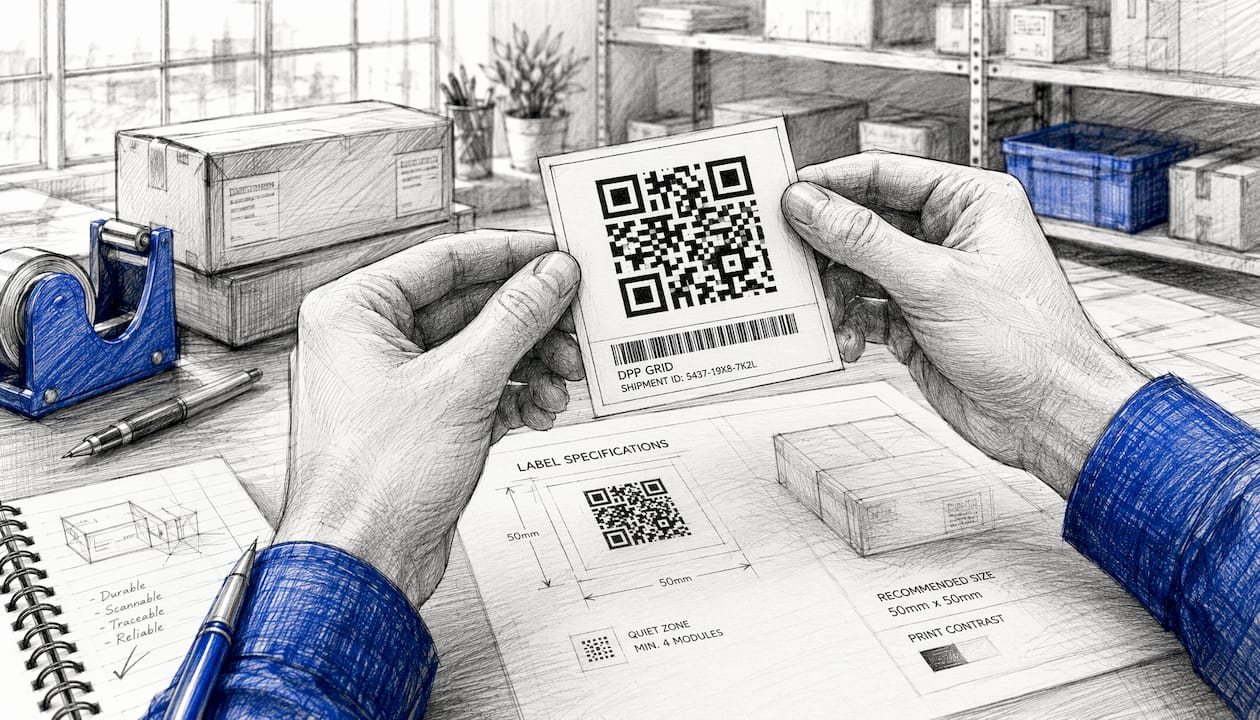
Physical QR codes fail when they are too small, too low-contrast, or printed without a quiet zone. GS1 specifies that a QR code used at checkout should be at least 14.6 mm x 14.6 mm. Anything smaller risks a failed scan, particularly under fluorescent retail lighting. Use dark modules on a light background, maintain a minimum contrast ratio of 4.5:1 for fluorescent environments, and always preserve the quiet zone (the blank border around the code). Never print a QR code on a busy pattern or a dark background.
Placement drives engagement
Where you put the code matters as much as what it links to. Proper placement on packaging and marketing materials increases scan rates and conversion. The highest-performing placements are product packaging (back or bottom panel), retail shelf tags, receipts, and bag stuffers. Window displays work well for driving after-hours traffic. Fitting rooms are underused in apparel retail.
Test before you print
Scan every code on both an iPhone and a mid-range Android device before committing to a print run. Check that the destination page loads in under three seconds on mobile. Pages that take longer than three seconds lose a significant share of visitors before they see any content. If the landing page is not mobile-optimized, fix that before the code goes on anything physical.
GDPR and privacy in EU markets
If your QR codes collect scan data, location data, or device identifiers from customers in the EU, that data collection falls under GDPR. You need a lawful basis for processing, a clear privacy notice accessible from the landing page, and a way for users to opt out of tracking. Scan analytics that aggregate counts without identifying individuals are generally lower-risk, but any tool that ties a scan to a specific user or device requires explicit consent. Check your QR platform's data processing terms before deploying in Central Europe.
Pro Tip: Some QR code vendors deactivate codes after a subscription lapses, which means printed packaging becomes useless overnight. Before committing to any platform, confirm in writing that codes remain active after cancellation.
Practical use cases for Shopify merchants
QR codes earn their place when they solve a real problem for the customer or reduce friction in a purchase. Here are the applications that consistently deliver results.
-
Product page links on packaging: A shopper picks up your product in a store or receives it in the mail. A QR code on the packaging takes them directly to the full product listing, with reviews, size guides, and related items. This is especially useful for products where the physical label cannot carry all the relevant information.
-
Checkout shortcut with discount: Print a QR code on a packaging insert that links directly to checkout with the product already in the cart and a loyalty discount applied. Shopify's Shopcodes app supports this natively, making it one of the fastest ways to drive repeat purchases from existing customers.
-
After-hours retail sales: A "Scan to shop" code on your store window lets people browsing outside your closed store buy immediately. Retailers use this to convert foot traffic that would otherwise be lost.
-
Product authenticity verification: A QR code linked to a verified product record gives customers a way to confirm they have a genuine item. This is particularly valuable for resale markets, where product authenticity via QR scan builds buyer confidence and supports brand reputation.
-
Review collection: A QR code on a receipt or packaging insert that links directly to your review page catches customers at the moment they are most likely to leave feedback. Research shows that 61% of people have scanned a QR code after making a purchase, making post-purchase placement one of the highest-converting spots.
-
Out-of-stock recovery: Place a QR code in front of an empty shelf slot linking to similar in-stock products or a back-in-stock notification signup. This recovers sales that would otherwise walk out the door.
-
Campaign tracking: Dynamic QR codes on print ads, flyers, and event materials let you measure exactly how much offline activity drives online traffic. Each code gets its own analytics, so you can compare a trade show flyer against a direct mail piece with real data.
How QR codes fit into product compliance in Central Europe
For Shopify merchants selling into Central Europe and the broader EU, QR codes are becoming more than a marketing tool. They are the physical access point for Digital Product Passports.
What is a Digital Product Passport?
A Digital Product Passport (DPP) is a structured digital record linked to a specific product, containing data on its origin, materials, manufacturing, care, repair, and end-of-life options. Under the EU's Ecodesign for Sustainable Products Regulation (ESPR), DPPs will be required for an expanding range of product categories. The physical link between the product and its digital record is typically a QR code on the label or packaging. The EU framework mandates open, interoperable standards for DPP data carriers, with GS1 encoding in QR codes as the principal recommended approach.
GS1 Digital Link: the standard that connects both worlds
GS1 Digital Link is the dominant open standard for encoding product identifiers in QR codes for both DPP compliance and the Sunrise 2027 retail transition, when major retailers begin requiring 2D barcodes at checkout. A single GS1 Digital Link QR code can serve the retailer's checkout scanner and the consumer's smartphone simultaneously, pointing each to the right data. That overlap is worth planning around now, because running two separate packaging projects costs twice as much.
One important clarification: a GS1 QR code alone does not make a product DPP compliant. Compliance depends on the required data, identifiers, access rules, and technical specifications for the specific product category. The code is the access mechanism. The data behind it is what regulators and consumers actually need.
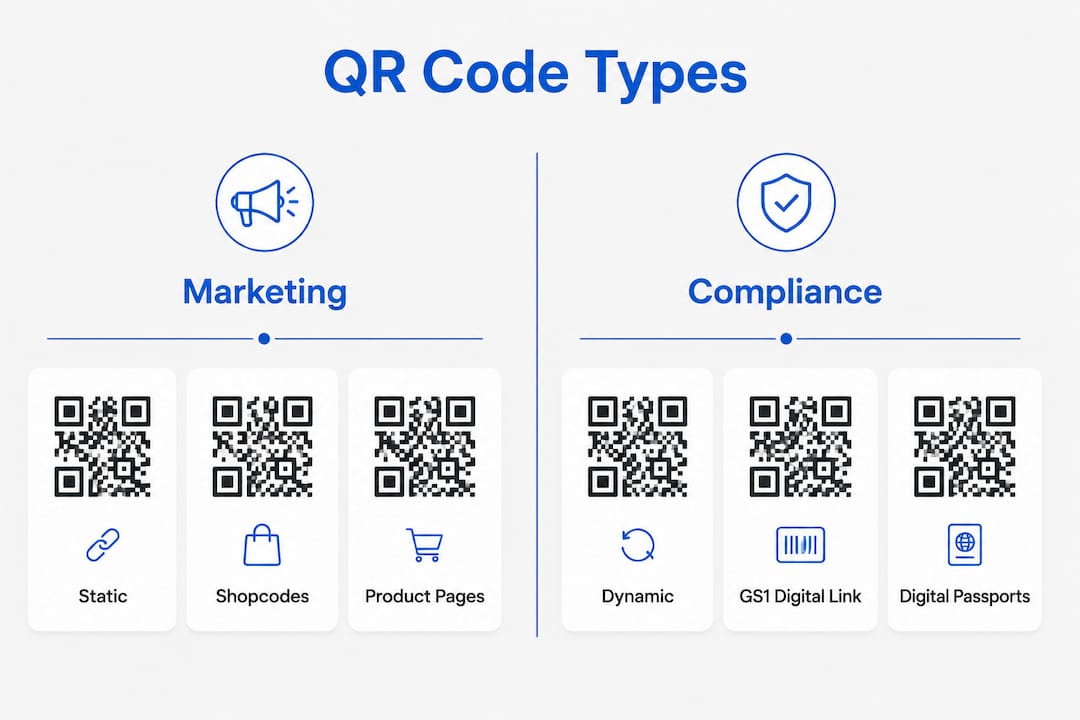
Standard marketing codes vs. compliance-ready codes
Shopify's built-in QR code generator creates marketing codes that link to product pages or checkout. These do not meet EU Digital Product Passport compliance requirements. A compliance-ready code needs to encode a unique product identifier using GS1 Digital Link URI syntax, resolve to a structured data record, and remain permanently accessible. The real value for ecommerce teams is centralizing and normalizing product data in a platform built for it, because a QR code alone does not guarantee compliance or product information accuracy.
Relying on proprietary QR platforms also creates risk, so understanding how live shopping fulfillment works for eCommerce brands helps merchants integrate digital tools effectively. Adopting open GS1 standards promotes long-term flexibility and avoids vendor lock-in, which matters when regulatory requirements are still evolving.
Pro Tip: Plan your QR code strategy to serve both marketing and regulatory demands from the start. A Shopify product passport integration that generates GS1-aligned QR codes means one code on your label handles consumer engagement, retail checkout, and DPP access, rather than three separate solutions.
The battery passport under Regulation (EU) 2023/1542 becomes mandatory from February 18, 2027 for certain battery categories, accessible via QR code linked to a unique identifier. This is the first concrete DPP deadline for many ecommerce merchants and a useful signal of the direction the broader ESPR framework is heading.
Key Takeaways
Shopify's built-in Shopcodes app handles marketing QR codes well, but merchants selling into the EU need GS1 Digital Link codes backed by structured product data to meet Digital Product Passport requirements.
| Point | Details |
|---|---|
| Shopify Shopcodes for marketing | The free Shopcodes app creates QR codes linking to product pages or checkout, with optional discount codes. |
| Dynamic codes protect print investment | Dynamic QR codes let you update the linked destination after printing, avoiding costly label reprints. |
| Minimum size for reliable scanning | GS1 specifies that QR codes used at checkout should meet size minimums to ensure reliable scanning. |
| GS1 Digital Link for EU compliance | DPP-ready codes must use GS1 Digital Link URI syntax; Shopify's native generator does not produce this format. |
| Vendor persistence matters | Confirm that your QR platform keeps codes active after subscription cancellation before printing on physical materials. |
How much does a QR code cost?
Basic static QR codes are free through tools like Shopify Shopcodes. Dynamic QR codes with analytics typically start at a few dollars per month through third-party platforms.
Do I need barcodes to sell on Shopify?
No. Shopify does not require barcodes to list or sell products. Barcodes become relevant when you sell through retail channels that require GS1 product identifiers or when preparing for EU Digital Product Passport compliance.
Is there a 100% free QR code generator?
Yes. Shopify's Shopcodes app is free and generates QR codes for product pages and checkout. Several third-party tools also offer free tiers for static codes, though dynamic codes with analytics usually require a paid plan.
Where do I find my Shopify QR code?
Install the Shopcodes app from the Shopify App Store, then open it from your admin. You can create and download codes from the app directly, or from the product detail page of any individual product in your catalog.
What is the difference between a marketing QR code and a DPP QR code?
A marketing QR code links to a product page or checkout and is managed through tools like Shopcodes. A DPP QR code encodes a unique product identifier using GS1 Digital Link URI syntax and resolves to a structured compliance data record. The two serve different purposes and are not interchangeable for EU regulatory requirements.
Shopify merchants selling into Central Europe who want to get ahead of Digital Product Passport requirements can explore how DDP Grid's Shopify integration connects product catalog data to compliance-ready passport pages and GS1-aligned QR codes, without replacing the marketing tools already in place.